
When it comes to background applications, be it a windows service or a Spring batch application, troubleshooting is one of the major design considerations. Since these apps work in the background it can become a real pain to identify the issues. In this article we will talk about small common sense things that can make our life very easy in production.
I generally perceive troubleshooting in three major categories, each having a different audience, objective and level of detail.
- Detailed Logs
- Audit Logs
- Business Logs
1. Detailed Logs
Audience: Developers, Production Support Teams, Infra structure teams
Level: Detailed (May list down major code flows, errors, information, warnings etc)
This kind of logs are very common and easy. Historically we have been logging such things either in the log files or in the database (which can be either a log table in the transactional database or a separate database containing only logs from different applications).
Since these logs are very detailed, you need some sort of a log analytics solution to better read and analyse these logs. These kind of software are called Log Aggregators, there are several types of log aggregators in the market now a days, some examples are mentioned below.
- Splunk
- Paper Trail
- Logz.io
- LogRhythm
These software have many capabilities like searching logs quickly, creating alerts on logs, reading logs from different sources like files, xmls, databases and events.
2. Audit Logs
Audience: Audit Teams, Bizops teams
Level: Action level
Audit logs are usually maintained where you need to store things mostly for compliance and audit purposes. For example say you are processing some files and moving them in different locations based on processing (archive, error, processed) etc, in this case you need to keep track of all the actions so that its easier to audit this data. So you can find exactly what actions were performed on a particular file.
Below is a proposed schema that you can use for logging such auditing events.
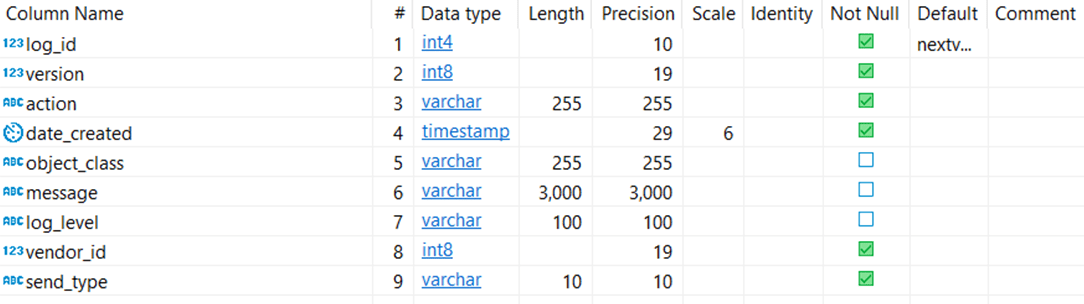
And here is the sample of how data looks like in the audio tables

3. Business Logs
Audience: Business teams
Level: Events, functional error, data errors
Detailed logs are usually very complex to extract and interpret, although tools like Splunk make it easier to interpret these logs, still business users are not able to scroll these logs. E.g, if an attribute of a product is not configured properly, someone from the product team need to fix it.
In order for business teams to check these kind of logs there are a few ways we should consider.
- Email to a particular business group
- Create a User Interface where they can log on and see the business errors / exceptions so that they can take actions.
Now, in order to be able to generate such business logs, you need to first persist them somewhere (likely in a database) and at the end of your batch job, you should read these events and generate email or show them on the UI.
Concluding remarks:
You might argue that Splunk alerts for example can do this, but be mindful that Splunk and such log aggregators are usually for technical teams and business teams usually don’t have access or expertise to such applications. Also such log aggregators have a lot of noisy data, but for the purpose of Audit and business alerts you need very specific data so you should not rely on the Production support teams to create alerts for you, rather application should be able to process and distribute such logs.
I’m not shy of tasty food and valuable comments. Feel free to bring any of these, anytime!

 Article Board